How do I get rid of characters like “▯▯▯▯” in place of the GDT symbols in my Excel report?
If your Excel Export is showing something similar to this in place of GD&T Frames:
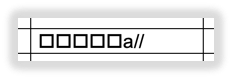
Download the InspectionXpert GD&T Font (InspectionXpert GDT):
After that navigate to "Options"> "General" and check the box that
says "Enable GD&T formatting for basic and reference dimensions".
Then click "Apply and "OK".
Related Articles
I have installed the GDT Font. Why do still characters like “▯▯▯▯” in place of the GDT symbols appear in the Excel report of my customer/ partner?
If third parties are to work with the original EMPBs, they will also need the InspectionXpert font. You can forward the link to download the installation file for the InspectionXpert GDT font: InspectionXpert GDT Font.
'Notes' are duplicated in the 'Comments' cell
When you extract a note that is longer than 50 characters, you may notice the extracted value is duplicated in the Comments cell of your report. This article will explain how to prevent that from happening if it is not the desired result. ...
Can I share a license with multiple users?
Yes, InspectionXpert is licensed on a concurrent use basis (like a network license). You can set up InspectionXpert on multiple computers. The number of users who can open the software simultaneously depends on the number of subscriptions you have.
Set Default Tolerances
Step-by-Step Guide: Click on the 'Home' tab located in the upper left-hand corner Select 'Options' Go to 'Project Options' Click on 'Characteristic' Go to the 'Default Tolerances' section Click on 'Linear', 'Angular' or add a custom tolerance by ...
InspectionXpert is now Ideagen Quality Control!
InspectionXpert is changing the look to reflect their new brand. Here's some answers to questions you may have. Since June 30th 2023, InspectionXpert OnDemand 2.0 has been renamed as Ideagen quality Control Professional. This product name change also ...