How to add a new classification?

How to add a new classification?

Open the Options window:

1. Click the "Home" tab, then select "Options".
2.Or, you can select "File", then click "Options".
3. Select "Lists".

Add a classification:

1. Click the "+" to add a classification
2. Choose a pre-defined classification from the drop-down, or create your own in the "Lists" section of the "Options" window:
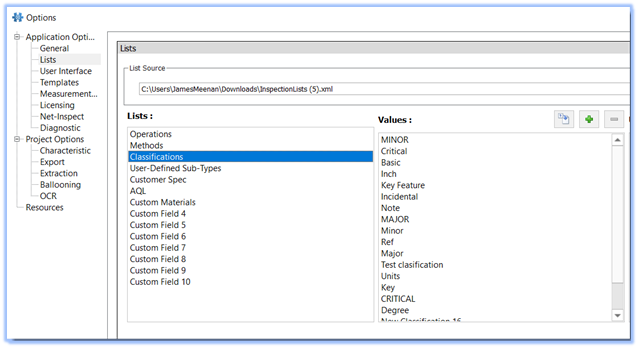

3. You can add classification values manually, or import them from a saved .CSV file.

Balloon Options

1. You can then specify a balloon prefix, suffix, or both as well as shape, color, and text size settings
2. Now, when you wish to use a custom balloon type, just balloon the drawing as usual, then select the classification from the menu:


To learn more about setting your balloon options you can read the following article: Setting yor Balloon options and Appearance


    • Related Articles

    • Setting your Balloon Options and Appearance

      There are three ways that balloon settings or options can be modified: 1. through the Ideagen Quality Control "Options" window: It's recommended that you set your project balloon options such as color, text size, etc. in the "Ballooning Options" ...
    • Set Default Tolerances

      Step-by-StepĀ Guide: Click on the 'Home' tab located in the upper left-hand cornerĀ  Select 'Options' Go to 'Project Options' Click on 'Characteristic' Go to the 'Default Tolerances' section Click on 'Linear', 'Angular' or add a custom tolerance by ...
    • Uninstall Ideagen Quality Control Professional (formerly InspectionXpert) -old

      This article will show you how to completely uninstall Ideagen Quality Control Professional (formerly InspectionXpert). Uninstalling Ideagen Quality Control Professional will not impact any saved projects, or any project or Excel template that you've ...
    • InspectionXpert is now Ideagen Quality Control!

      InspectionXpert is changing the look to reflect their new brand. Here's some answers to questions you may have. Since June 30th 2023, InspectionXpert OnDemand 2.0 has been renamed as Ideagen quality Control Professional. This product name change also ...
    • System Requirements Ideagen Quality Control Professional (formerly InspectionXpert)

      The following article provides a list of end-user software and hardware requirements to achieve the best results when installing and using Ideagen Quality Control Professional (formerly InspectionXpert) End User Requirements RAM/ CPU 4GB RAM minimum, ...